
How to apply for authorisation to provide Australian courses offshore
Application guide for authorisation to provide Australian courses offshore
Notifications required of providers with authorisation to provide Australian courses offshore
TEQSA’s provider portal is unavailable.
On 1 April 2025, TEQSA implemented a new centralised enquiries approach that will deliver greater benefits for registered higher education providers.
TEQSA’s Enquiries Management team is now the dedicated first point of contact for all new provider enquiries.
Providers making a future enquiry should use the following contact details:
TEQSA will aim to respond provider enquiries within 5 business days. Complex enquiries may take longer, however we will keep you updated and informed on our progress including when additional time is needed.
The shift to a centralised model, foreshadowed during our service charter consultation in 2024, reinforces TEQSA’s commitment to deliver high-quality and timely service to the higher education sector.
With the release of our updated service charter later this year, TEQSA remains focused on continuous monitoring and review to strengthen our service and approach to stakeholder engagement.
TEQSA was saddened to learn of the passing of former TEQSA Commissioner Dr Linley (Lin) Martin AO, on 28 December 2025.
Dr Martin was appointed as a TEQSA Commissioner in 2015 and made a valuable contribution to TEQSA through to January 2020. Beyond her role as Commissioner, Dr Martin is recognised for her significant contributions to Australian higher education, including in the areas of student equity policy and enhancing the student experience.
Dr Martin held several key roles across the Australian higher education sector throughout the span of her career. She was a strategic leader and policy thinker working across several higher education institutions, including RMIT University, The University of Melbourne, Deakin University, the University of New South Wales, Flinders University and the University of South Australia. She was a mentor to many colleagues across the sector while also contributing in the roles of Non-Executive Director of Cooperative Action by Victorian Academic Libraries (CAVAL) and Senior Adviser to the Bradley Review in 2008, among a broad array of other key sector appointments.
In 2020 she was appointed an Officer (AO) in the General Division of the Order of Australia for distinguished service to education, and particularly to student equity, educational standards and academic administration.
On behalf of past and present Commissioners and staff, TEQSA extends its deepest sympathies to Dr Martin’s loved ones and colleagues.
This document contains responses to frequently asked questions relating to the TEQSA provider portal. Contact the TEQSA Enquiries Management team at providerenquiries@teqsa.gov.au if you have additional questions.
For existing TEQSA registered providers, the principal contact or CEO/PEO should email the TEQSA Enquiries Management team (providerenquiries@teqsa.gov.au), and include the full name, email address, phone number and role (TEQSA application contact, ESOS application contact, or both) for the proposed user/s. TEQSA will email the login details and relevant information to the nominated user/s directly.
For prospective initial registration applicants, the principal contact or CEO/PEO should email the Initial Registration Assessment team (new.registration.enquiries@teqsa.gov.au) approximately 6 months prior to applying for initial registration to TEQSA to arrange portal access.
| For a PC: |
Chrome |
Internet Explorer (IE) 10 or 11 |
| For a Mac: |
Chrome |
Check what version of what browser you are currently using.
Note:
The initial password is a temporary password assigned by TEQSA. The user is required to change this on first log in. The federal government requirement is that passwords are at least nine characters long, and contain at least:
Users can self-manage their portal password using the ‘Forgotten your login details?’ option on the Sign In screen, or ‘Change Password’ drop-down option when logged in to the portal (not available when working within an application form). Passwords used in the past year cannot be re-used.
Note: Five failed login attempts from the Sign In screen will lock the user’s account. If your account is locked, the ‘Forgotten your login details?’ functionality will not work, and you will need to contact the TEQSA CRM team (CRM@teqsa.gov.au) to have your account unlocked and password reset.
There is a time out after 30 minutes of inactivity. The message ‘Your current session has expired, please login again.’ will appear if you try to do anything in the portal after 30 minutes of inactivity. You can log back in to resume work.
Note: Changes made but not saved before the time out occurs will be lost.
A walkthrough video is available on our YouTube channel. Contact the TEQSA Enquiries Management team at providerenquiries@teqsa.gov.au if you require additional assistance.
No. There is no restriction on the number of provider portal users for any given provider.
All portal users for the same provider have the same level of access to the provider portal. All users can update any existing application or request, and create and submit applications. The ‘Modified By’ and ‘Submitted By’ details show the last user to update/submit an application or request.
Yes. TEQSA staff will have access to the provider portal to assist with any questions or administration, including maintaining the document repository, but TEQSA Assessment Managers will only commence work on applications and requests following submission (and receipt of any applicable fee/s).
Note: TEQSA staff will not usually look at the provider portal unless it is necessary to do so following contact from a provider (e.g. in order to address questions or assist the provider in some way).
Each username is linked to a single registered legal entity (not trading name) in the portal, rather than a group of related providers from which a specific provider could be selected.
The user will require a different username (i.e. email address) for each provider they require portal access for.
Sample portal screenshots and application snapshots of most application forms available in the provider portal can be obtained from the TEQSA Enquiries Management team at providerenquiries@teqsa.gov.au.
Alternatively, you may also choose to start an application (refer to How do I start an application?) and create a PDF snapshot (refer to How do I take a snapshot of an application?).
Click on the ‘TEQSA Forms’ or ‘CRICOS Forms’ buttons on the left hand side of the Home page or Applications page to see the lists of forms currently available to you in the provider portal. Click on the button for a specific form to read the form overview, then click on the ‘Continue’ button to start an application or the ‘Cancel’ button to return to the Home page.
Note: You should refer to the relevant guidance notes to confirm evidence requirements, or contact the relevant TEQSA Regulatory Operations team (Initial Registration, Renewal of Registration and/or Courses Teams), if you have specific questions about evidence requirements for your application.
Providers can contact relevant teams by referring to TEQSA’s key contacts webpage.
Discuss the issue with the TEQSA Enquiries Management team at providerenquiries@teqsa.gov.au. Additional forms can be made available as needed.
Click on the ‘…’ icon beside the relevant application on the Home page or Applications page, then select the ‘Edit Application’ menu option.
Note: If you think that your changes to an application are not being saved between portal sessions, it may be that you are opening a new application each time (by selecting the form from the left hand side menu option) rather than editing your existing application/s.
No. There is no limit.
Technically, yes. However, the responses saved by the last user to modify the application will overwrite any changes made by other user. To avoid any possible complications, it is highly recommended that only one person should update any given application at any given time. This must be managed by the provider as there is no system restriction that prevents multiple users accessing the same application at the same time.
No. There is no merging capability available.
Clicking on the browser’s Back button when editing an application form will result in the loss of any unsaved changes. You may be returned to the portal Home page or see a 404 error message displayed on the screen. If this should happen, try using the browser’s Forward button to return to the application form.
You should use the form navigation links on the left hand side to switch between pages/sections. To exit an application form, click on the ‘Close’ (Overview) or the ‘Save & Close’ (all pages except Overview) button.
Clicking on the browser’s Refresh button will reload the form. Any unsaved changes will be lost and the first page of the application form will be displayed.
No. However, a warning message will appear if you try to navigate away from a page without saving any changes you have made.
Click on the ‘Create PDF’ button to take a snapshot of the application as it stands at that point in time. The application snapshot shows all questions, saved responses (e.g. text entry and drop down options selected), and evidence (i.e. files and links) attached.
The application forms are typically more granular than the corresponding application guides, so providers should use the application form to structure and group evidence when preparing evidence offline. Providers may find that the structure of some application guides differ slightly to the application forms.
Yes. Notes can be added against any application, whether submitted or not, by clicking on the ‘…’ icon next to the relevant application (on the Home or Applications page) and selecting the ‘Edit Notes’ menu option.
Note: These notes do not form part of the application and are not seen by the TEQSA Enquiries Management team (providerenquiries@teqsa.gov.au) or the assessment team.
All users with access to the provider portal can start, edit and submit applications. The portal will track the name of the person who most recently edited/saved/submitted an application and display this in the ‘Modified By’ column, alongside the date of the change.
Note: If a user opens an unsubmitted application form and clicks on the ‘Save & Close’ button without making any changes to the application, the ‘Modified By’ and ‘Modified’ details will be updated regardless. To avoid this, use the ‘Close’ button on the Overview page of the form instead.
No. Selecting ‘Ready to Submit’ within an application allows providers to manage/sort applications by status. However, applications with a status of ‘Ready for Submission’ can still be edited.
Providers cannot delete applications themselves. Please email the TEQSA Enquiries Management team at providerenquiries@teqsa.gov.au, requesting removal/deletion of any unwanted applications.
Note: Deleted applications will be completely removed from TEQSA systems. Application deletion cannot be reversed.
No. Templates are provided for declarations. The relevant declaration template should be downloaded from within the application form, printed, signed, scanned and uploaded back into the application.
No. TEQSA Assessment Managers do not proactively offer feedback or updates on applications before they are submitted.
No. Providers only see three status values for applications on the portal: Awaiting Provider Completion; Ready for Submission; and Submitted. The provider does not see the status of applications as they are progressed internally by TEQSA.
The provider portal will only display full details for applications that were submitted to TEQSA via the portal. Although records for applications submitted via post/email may appear in the provider portal, they will not include an invoice, PDF snapshot, or the evidence submitted (also, evidence submitted via post/email will not be available in the provider’s document repository).
No. There is no ‘copy and change’ functionality for applications in the provider portal. Applications submitted via the portal are available for reference, including the PDF snapshot produced by the system at the time of submission (allowing cut and paste of text responses) and the evidence attached - refer to How do I view a submitted application?.
The data entry fields in application forms allow for basic text entry with no special formatting. If you want to format your response to such questions in a particular way, you could prepare your response offline and submit it as a document (e.g. Word or PDF) in the ‘Attach evidence here’ section (or on the additional information page).
A maximum of 4000 characters is allowed (either by direct entry or pasting in copied text). Only the first 4000 characters will display/save if you attempt to copy and paste more than 4000 characters of text.
A character count message beneath the multiple line text boxes indicates the number of characters in your response - this character count will display in red if your response contains 3900 characters or more. Upload a document (e.g. Word or PDF) in the ‘Attach evidence here’ section (or on the additional information page) if more space is required.
The following file types are supported:
| doc |
|
mp3 |
swf |
mdb |
| docx |
txt |
mp4 |
jpg |
zip |
| xls |
csv |
wav |
tif |
html |
| xlsx |
xml |
wma |
db |
Contact the TEQSA Enquiries Management team at providerenquiries@teqsa.gov.au before submitting a file of a type that does not appear in the list above.
Yes. An error message will appear when attempting to upload any file with a file name:
| tilde (~) |
asterisk (*) |
pipe (|) |
angle brackets (< or >) |
| hash (#) |
plus (+) |
colon (:) |
braces ({ or }) |
| percent (%) |
slash (/) |
quotation mark (") |
|
| ampersand (&) |
backslash (\) |
question mark (?) |
|
Yes. The size limit for each file is 10MB. If you attempt to upload larger files to an application or request, an error message will appear and the applicable row in the file list will turn pink.
Larger files could be provided via a link (e.g. to provider’s website or YouTube). Alternatively, contact the TEQSA Enquiries Management team at providerenquiries@teqsa.gov.au for an alternative option.
The drag-and-drop functionality allows for the simultaneous upload of multiple documents to the portal. Any documents that fail to meet the file name and size requirements will be rejected. Other documents included in the same drag-and-drop that satisfy these requirements will be accepted.
All files uploaded to an application or request are automatically saved to the provider’s document repository. Documents can then be assigned from the document repository to other questions in the same application, as well as other applications or requests.
To assign a file to an application or request, click on the green triangle symbol next to the words ‘Assign from document repository’. This will ‘twist’ open and display the files in the document repository.
You can use the search (within applications, not requests), sort and/or filter functions to find the document/s you wish to assign to the question or request. Activate/select the ‘tick’ box against the relevant document/s, and then select the ‘Assign all selected’ button. The selected document/s will then be assigned to the application question or request.
Note:
Due to the transitory nature of website content, the web addresses (URLs) for relevant links are not saved in a ‘repository’ and must be entered in full each time they are used.
If a link to a particular file (rather than webpage) is likely to be reused in future, consider adding the file itself to the question or request as this will place a copy in the document repository.
Yes, provided the application or request has not yet been submitted to TEQSA:
Note: This will not delete any instances of this file in the same application, other applications or requests, or the document repository. As users cannot delete files from the document repository itself, contact the TEQSA Enquiries Management team at providerenquiries@teqsa.gov.au if any files need to be deleted from the document repository.
Yes, but only if the application or request has not yet been submitted to TEQSA:
Delete the existing document from the question/request (refer to Can I remove a file from an application or request?), and use the ‘+ new item’ or drag-and-drop functionality to add the new version of the document against the question/request. Both files will be available in the document repository.
Note:
There is two-stage process to submit one or more applications:
Once you have confirmed the submission, the final Submission Confirmation/Invoice can be accessed via the application/s you have just submitted - refer to What is the difference between the draft and final invoice? and How do I access a copy of the invoice for a submitted application?.
Note: Your application/s will only be submitted to TEQSA when you click on the ‘Confirm Submission’ button. Although you will see a ‘Processing…’ message while the system completes the submission process, you will not get a message following successful application submission - refer to How will I know that the application submission process was successful?.
For most environments, the draft invoice should appear as an embedded PDF within the web page, beneath the ‘Draft Invoice’ heading and the ‘Confirm Submission’ and ‘Cancel Submission’ buttons.
If you do not see the draft invoice appear as an embedded PDF, it may have been downloaded as a PDF to your computer. Check for any newly created PDFs which may be the draft invoice. You may have to minimise one or more screens to display the ‘Open PDF’ command. Alternatively, the issue may be with your browser – refer to Which browsers can I use with the provider portal?.
This situation will occur if you are trying to submit one or more course accreditation and/or re- accreditation applications that have not had any courses included in the application/s. Click on the ‘Cancel Submission’ button, add the required course/s to the relevant application/s and then attempt resubmission. Each course should appear in the invoice as a distinct invoice item.
Yes. Applications with a status of either ‘Awaiting Provider Completion’ or ‘Ready for Submission’ can be submitted.
It is not mandatory that the ‘Ready to Submit’ button be pressed within the application form to change the application’s status before it can be submitted. However, it is important that providers ensure that applications are complete and accurate, and double check the correct application/s are included in the draft Submission Confirmation/Invoice, before submitting them to TEQSA – refer to Can a submitted application be edited, or a submission reversed?.
Yes. If you have a large number of unsubmitted applications, you may need to use the sort/filter functionality of the applications list to get the relevant applications on the same page. The ‘Draft Invoice’ screen will display the applications proposed for submission together for final review before the submission is confirmed.
No. There are no mandatory sections in any application form, and only a few mandatory fields in selected forms (e.g. the course name, AQF level and broad/narrow/detailed fields of education are required when adding courses in a course accreditation application). Providers must ensure that applications are complete and accurate, as included in the application declaration, before submitting them to TEQSA.
Following successful application submission, you will be redirected to the ‘Not Submitted’ view of the Applications page. The application/s you just submitted will no longer appear in this list, but can now be found on the ‘Submitted’ or ‘All’ views of the Applications page.
No. Submitted applications are ‘locked’ and the system does not allow ‘roll back’ or reversal of application submissions. Accordingly, it is important that providers ensure that applications are complete and accurate, and double check the correct application/s are included in the draft Submission Confirmation/Invoice, before submitting them to TEQSA.
If amendments are required to a submitted application, discuss the situation with your Assessment Manager. Options may include:
No. Application submission via the provider portal is independent of payment processing. However, your application/s will not be reviewed until the application fee, if applicable, has been received by TEQSA.
The draft invoice is provided as part of the submission process to allow the provider to double check the application/s (and course/s, where applicable) selected for submission and confirm fee/s due, if applicable.
The final invoice can be accessed immediately after confirming a submission - refer to How do I access a copy of the invoice for a submitted application?.
Note: The draft invoice will only have an invoice ID (but no ‘Submitted’ date or ‘Submitted By’) at the top of the invoice, whereas the final invoice will include all of these details.
Although initial invoices for fees relating to preliminary assessment and full assessment services are generated by the system, substantive assessment fees will appear on manually created invoices which will be emailed to providers by their Assessment Manager at an appropriate time (these will not be available on the provider portal).
No. Assessment Managers from the relevant TEQSA team (Initial Registration, Renewal of Registration, Courses, CRICOS, Material Changes, Compliance and Investigations) will communicate with providers (via email or phone) about any new requests that have been made available in the provider portal.
Click on the ‘…’ icon next to the applicable request on the Home or Requests page, then select the ‘Respond to Request’ menu option. There are two main sections for documents:
Refer to the FAQs under Evidence (context, documents and links) management.
Ensure that you are using an internet browser that is compatible with the portal – refer to Which internet browsers can I use to access the provider portal?.
The invoice you saw was a draft invoice, generated in the first stage of the two-stage submission process. You must press the ‘Confirm Submission’ button on the ‘Draft Invoice’ screen to complete the submission process – refer to How do I submit an application?.
Each time the first stage of the submission process is actioned, the draft invoice created will have a unique ID number.
Note: the draft invoice will only have an invoice ID (but no ‘Submitted’ date or ‘Submitted By’) at the top of the invoice, whereas the final invoice will include all of these details.
Ensure that your browser’s pop-up blocker is disabled or that the portal is an exception/allowed site.
| Decision: | Rejected |
|---|---|
| Date of decision: | 10 December 2025 |
| Main reasons for decision: |
The decisions were made on the basis that TEQSA was not satisfied that Guru-Kool Pty Ltd, trading as Adelaide Institute of Sciences, meets the following provisions of the Higher Education Standards Framework (Threshold Standards) 2021:
The decision to reject the application for accreditation of the course was made as a consequence of the application for registration being rejected and fundamental deficiencies in critical academic governance Standards as detailed above. |
| Review stage: |
This page contains information about TEQSA’s application fees for 2026. TEQSA’s application fees are based on the updated version of TEQSA’s Cost Recovery Implementation Statement (CRIS) and determined by the Tertiary Education Quality and Standards Agency Determination of Fees No 1 of 2020 (Fee Determination) as amended by the Tertiary Education Quality and Standards Agency Fees Amendment (2025 Measures No 2) Determination 2025.
A summary of the fees that apply to applications made on or after 1 January 2026 is set out below.
| Item | Activity for which the fee is imposed | Amount of the fee on or after 1 January 2026 |
|
1 |
Preliminary assessment of application for registration as a higher education provider (s 19 of the TEQSA Act)
|
$14,700
|
|
2 |
Substantive assessment of application for registration as a higher education provider (s 20 of the TEQSA Act)
|
$112,100
|
|
3 |
Renewal of registration application (s 35 of the TEQSA Act)
[where the higher education provider is not also applying for self-accreditation, otherwise see row 4 below] |
Where the approved form for the application requires the applicant to address provisions of the Threshold Standards other than the Core Standards: $113,000
Otherwise: $66,000 |
|
4 |
Renewal of registration application combined with application for self-accreditation (ss 35 and 41 of the TEQSA Act)
[where the higher education provider applies for renewal of registration and for authority to self-accredit one or more courses of study at the same time] |
Where the approved form for the application requires the applicant to address provisions of the Threshold Standards other than the Core Standards: $129,200
Otherwise: $75,000 |
|
5 |
Application for change of higher education provider category (s 38 of the TEQSA Act) | $51,800 |
|
6 |
Application to TEQSA as an ESOS Agency for registration to provide a course or courses at a location or locations to overseas students (s 9 of the Education for Overseas Students Act 2000 (ESOS Act)). |
$24,500
|
|
7 |
Application to TEQSA as an ESOS Agency for renewal of registration (s 10D of the ESOS Act) |
Where the provider has self-accrediting authority: $13,600 Where the provider does not have self-accrediting authority: $27,500
|
|
8 |
Application to TEQSA as an ESOS Agency to add one or more courses at one or more additional locations to a provider’s registration (s 10H of the ESOS Act) |
For each location for which the provider is not registered at the time of the application:
For each course for which the provider is not registered at any location at the time of the application:
|
| Item | Activity for which the fee is imposed | Amount of the fee |
| 9 |
Application for authority to self-accredit one or more courses of study (s 41 of the TEQSA Act) [where the higher education provider has not applied for renewal of registration at the same time, otherwise see row 4 of above] |
For an application by a higher education provider with no existing authority under the Act to self-accredit a course or group of courses of study: $51,800 For an application by a higher education provider which is authorised under the TEQSA Act to self-accredit one or more courses of study: $36,800 |
| 10 | Preliminary assessment of application by a prospective provider for accreditation of a course of study (other than an undergraduate certificate) (s 47 of the TEQSA Act) |
$6,000 per course* where a prospective provider has an equivalent full-time student load of less than 5,000, see discussion of discounts below |
| 11 | Substantive assessment of application by a prospective provider for accreditation of a course of study (other than an undergraduate certificate) (s 48 of the TEQSA Act) |
Where an application is for accreditation of a single course of study or multiple courses of study that do not form a nested set of courses: $44,700 per course
* where a prospective provider has an equivalent full-time student load of less than 5,000, see discussion of discounts below |
| 12 | Preliminary assessment of application by a registered higher education provider for accreditation of a course of study (other than an undergraduate certificate) (s 47 of the TEQSA Act) |
Where an application is for accreditation of a single course of study or multiple courses of study that do not form a nested set of courses: $5,200 per course
* where a higher education provider has an equivalent full-time student load of less than 5,000, see discussion of discounts below |
| 13 | Substantive assessment of application by a registered higher education provider for accreditation of a course of study (other than an undergraduate certificate) (s 48 of the TEQSA Act) |
Where an application is for accreditation of a single course of study or multiple courses of study that do not form a nested set of courses: $19,100 per course.
* where a higher education provider has an equivalent full-time student load of less than 5,000, see discussion of discounts below |
| 14 | Preliminary assessment of application for accreditation of an undergraduate certificate (s 47 of the TEQSA Act) | $300 per course |
| 15 | Substantive assessment of application for accreditation of an undergraduate certificate (s 48 of the TEQSA Act) | $1,300 per course |
| 16 | Application for renewal of accreditation for a course of study (other than an undergraduate certificate or an application made on the basis of teach out) (s 55 of the TEQSA Act) |
Where an application is for renewal of accreditation of a single course of study or multiple courses of study that do not form a nested set of courses: $24,500 per course
* where a higher education provider has an equivalent full-time student load of less than 5,000, see discussion of discounts below |
| 17 | Application for renewal of accreditation for teach out course of study (other than an undergraduate certificate) (s 55 of the TEQSA Act) |
Where an application is for accreditation of a single course of study or multiple courses of study that do not form a nested set of courses: $3,100 per course
* where a higher education provider has an equivalent full-time student load of less than 5,000, see discussion of discounts below |
| 18 | Application for renewal of accreditation for an undergraduate certificate (s 55 of the TEQSA Act) | $1,200 per course |
| Item | Activity after 1 January 2026 for which the fee is imposed | Amount of the fee |
| 19 | Application to vary or revoke a condition of registration or accreditation (s 32(3) or s 53(3) of the TEQSA Act) |
For an application made under subsection 32(3) in relation to a condition imposed on a higher education provider’s registration: $3,900 per condition. For an application made under subsection 53(3) in relation to a condition imposed on the accreditation of a course: $3,100 per condition. |
| Item | Activity after 1 January 2026 for which the fee is imposed | Amount of the fee |
| 20 |
Application for internal review of a decision made by a delegate of TEQSA (s 184 of the Act and s 169AD of the ESOS Act)
|
$1,100 |
| Item | Activity for which the fee is imposed | Amount of the fee |
| 21 |
Application for authorisation to as an authorised offshore provider (s 44B of the TEQSA Act)
|
$36,800 |
| 22 | Application to vary or revoke a condition imposed on the authorisation of a provider as an authorised offshore provider (s 44J(3) of the TEQSA Act) | $3,900 |
TEQSA’s fees and charges model provides for discounts of up to 70% to some course accreditation or renewal of course accreditation application fees.
The discounts apply to applications made on or after 1 January 2023 by providers with an equivalent full-time student load (EFTSL) of less than 5,000.
See section 2 in Schedule B of the Fee Determination for further details.
You can request TEQSA reconsider some decisions relating to application fees or apply to the Administrative Review Tribunal for a review of some decisions. See sections 8 - 10 of the Fee Determination for further information.
All applications must include the full payment for the service being provided.
Assessments of applications will not commence until payment has been received in full.
Payment must be made by:
NOTE:
All higher education providers have to pay the annual Registered Higher Education Provider (RHEP) charge.
The RHEP charge is the sum of a base component and a compliance component that will cover compliance activities undertaken in relation to the provider in the preceding calendar year.
This page contains information about the RHEP charge for 2026, which is based on the updated version of TEQSA’s Cost Recovery Implementation Statement (CRIS) and the Tertiary Education Quality and Standards Agency (Charges) Regulations 2022 as amended by the Tertiary Education Quality and Standards Agency (Charges) Amendment Regulations 2025.
Figure 1: An illustration of the composition of the Registered Higher Education Provider (RHEP) charge
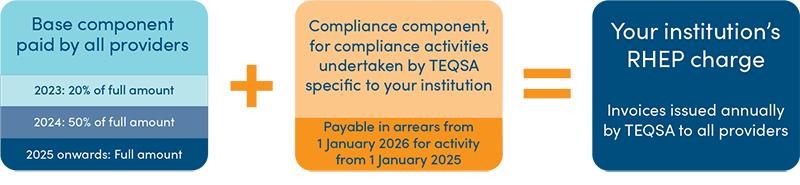
Invoices for the RHEP charge will be issued to providers early in each calendar year. You will have at least 30 days from the date on the invoice to pay your RHEP charge.
From 2025 onwards
TEQSA will issue each registered higher education provider with a RHEP charge invoice. The RHEP charge will comprise:
To learn more about deadlines for payment, see: Section 5 of Tertiary Education Quality and Standards Agency (Registered Higher Education Provider Charge) Guidelines 2022 (Charging Guidelines) for further information.
TEQSA will use the below formula, found in the updated version of the CRIS, to determine the base component of your annual RHEP charge for 2026:
Figure 2: Formula for base component of the RHEP charge

More about this formula
In working out, for the purposes of subsection (2), the number of students enrolled on an equivalent full-time basis in an accredited course in a year:
Example: A full-time student is enrolled in 8 units of study as part of a course for a year and is counted as 1 student. A part-time student is enrolled in 4 units of study as part of that course and is counted as half of 1 student. Another student is enrolled in 10 units of study as part of that course and is counted as 1 and a quarter of 1 student.
Table 1: Phased introduction of the base component charge, see section 6 of the Charges Regulations
| Year | You pay |
|---|---|
| 2023 | 20% of the amount calculated using the base component formula |
| 2024 | 50% of the amount calculated using the base component formula |
| 2025 onwards | 100% of the amount calculated using the base component formula |
The other component of the annual RHEP charge relates to compliance activities.
It is based on compliance activity undertaken in relation to your registered higher education provider in the previous calendar year.
In 2026, the compliance component of the RHEP charge will be for compliance activity undertaken in 2025.
The amounts a registered higher education provider will have to pay, from 2025 onwards, in relation to compliance activities undertaken in the previous calendar year are summarised below:
| Item | Compliance Activity | Amount |
|
Assessments |
||
| 1 | TEQSA commenced an assessment under s 59 of the Tertiary Education Quality and Standards Act 2011 (TEQSA Act) to assess whether the registered higher education provider continued to meet the Threshold Standards | $39,600 for each assessment commenced in the previous calendar year |
| 2 | TEQSA commenced an assessment under s 61 of the TEQSA Act in respect of one of the registered higher education provider’s accredited courses | $39,600 for each assessment commenced in the previous calendar year |
| 3 | TEQSA commenced an audit under s 112A(1) of the Education Services for Overseas Students Act 2000 (ESOS Act) | $39,600 for each audit commenced in the previous calendar year (for audits conducted after 1 January 2024) |
|
Conditions imposed under the TEQSA or ESOS Acts |
||
| 4 |
If at any time during the previous year, conditions imposed under:
applied to the provider’s registration. |
$4,500 for each condition that applied to the provider’s registration at any time during the previous calendar year (regardless of in which year the condition was originally imposed) |
| 5 | If at any time in the previous year, conditions imposed under s 53(1) of the TEQSA Act applied to the accreditation of a course of study offered by the provider. | $3,700 for each condition that applied to the accreditation of a course of study at any time during the previous calendar year (regardless of in which year the condition was originally imposed) |
|
Compliance undertakings (also known as voluntary undertakings) *see definition of ‘compliance undertaking’ in section 4 of Charges Regulation |
||
| 6 | If, at any time in the previous year, one or more compliance undertakings were in force in relation to the higher education provider | $1,800 for each undertaking that was in force during the previous calendar year |
|
Investigations |
||
| 7 | If, at any time in the previous year, TEQSA conducted an investigation in relation to a matter that constitutes, or may constitute, a contravention of an offence provision or a civil penalty provision by the provider | $180 for each hour spent in conducting the investigation in the previous calendar year (regardless of whether the investigation is ongoing) |
You can request TEQSA reconsider some decisions relating to the RHEP charge or apply to the Administrative Review Tribunal for a review of decisions. See sections 8 and 9 of the Charging Guidelines for further information.
TEQSA has released the updated version of our Cost Recovery Implementation Statement (CRIS), and a supplement to the CRIS, setting out our fees and charges for our regulatory activities from 1 January 2026 onwards.
The updated CRIS was developed after TEQSA reviewed the operation of its fees and charges to ensure a fair and accurate reflection of the cost of our regulatory activities. We also thank those who provided valuable feedback during our public consultation for the draft CRIS in September.
The supplement to the CRIS reflects recent amendments to the Education Legislation Amendment (Integrity and Other Measures) Act 2025 (ELA Act), conferring power on TEQSA to authorise and regulate the provision of higher education courses at offshore premises.
Two new application fees have been added relating to authorisation for providing courses offshore. They are:
Resulting adjustments have also reduced most of the other fees in the updated CRIS from the amounts proposed by TEQSA during the consultation phase.
The updated CRIS also reflects revised regulations to specify the amounts for the annual Registered Higher Education Provider (RHEP) charge.
Providers can expect to receive their RHEP charge invoices in February 2026.
This page summarises key information relating to material change notifications, and seeks to address key questions including:
Section 29 of the Tertiary Education Quality and Standards Agency Act 2011 (TEQSA Act) requires that registered higher education providers must notify TEQSA of events that happen or are likely to happen that will significantly impact the provider’s ability to meet the Higher Education Standards Framework (Threshold Standards) 2021 (Threshold Standards) and/or that require the National Register to be updated in respect of the provider.
A ‘material change notification’ is how providers ensure timely disclosure of such events to TEQSA.
Notification must be given no later than 14 days after the day that the provider would reasonably be expected to have become aware of the event.
Notifications do not constitute an application for approval to implement changes, as approval is not required. However, TEQSA will follow up if it considers there is a risk of non-compliance with standards in the Threshold Standards.
Providers with authorisation to offer or confer Australian higher education awards for one or more offshore provided Australian courses of study should be mindful of the notification requirements under section 44G of the TEQSA Act relating to offshore delivery. Information about notifications for offshore delivery arrangements are outlined on TEQSA’s website:
Providers subject to the Education Services for Overseas Students Act 2000 (ESOS Act) and National Code of Practice for Providers of Education and Training to Overseas Students 2018 (National Code) should be mindful of any notification and application requirements arising from changes in circumstances under the ESOS Act.
Information about notifications and approvals required under the ESOS Framework, including timeframes for reporting changes, are outlined on TEQSA’s website:
Providers should use the relevant CRICOS change form to notify TEQSA of any changes that require notification under the ESOS Act.
Providers must notify TEQSA of any of the following changes that require an update to the National Register:
Providers are also required to notify TEQSA if an event happens or is likely to happen that will significantly affect the provider’s ability to meet the requirements of the Threshold Standards. What constitutes ‘significant’ is informed by the individual circumstances of the provider. It is the responsibility of each provider to decide whether an incident significantly affects its ability to comply with the Threshold Standards.
When deciding whether a change or event requires reporting to TEQSA, providers should consider:
In general, any event, critical incident or emergent risk which may significantly impact a provider’s capacity to reasonably uphold their quality of education, governance arrangements, financial viability or wellbeing and safety of students and staff should be reported to TEQSA.
Providers should notify TEQSA where they are unsure about the impact the event or change will have on their ability to comply with the Threshold Standards or the appropriate response to the impact or change.
Where providers become aware of non-compliance with the Threshold Standards, these instances should also be reported to TEQSA along with the actions being taken to rectify the non-compliance and prevent repeated breaches.
TEQSA considers that the following are some examples of events that may significantly impact a provider’s ability to comply with the Threshold Standards. This is not a definitive list and is indicative only.
Providers who are unsure of whether a notification is required may contact TEQSA via materialchanges@teqsa.gov.au for further advice.
| Notification likely required | Examples | |
|---|---|---|
| Corporate governance | Events that will significantly affect the ability of a provider’s governing body to remain accountable for, and exercise competent governance oversight over, the provider’s operations (Section 6.1) | Corporate governing body membership: Provider A recently decided on changes to its governing body membership. The composition of the governing body may no longer comprise an appropriate mix of qualified, experienced and suitable personnel, limiting its ability to competently oversee the provider’s operations and attend to key governance functions. |
| Third-party delivery: Provider B is entering into a new third-party delivery arrangement. Delivery of a course at arm’s length from the provider may significantly affect the governing body’s ability to oversee all aspects of course management, delivery and student support and manage the heightened risks to compliance with the Threshold Standards. | ||
| Events that will significantly affect a provider’s ability to comply with legislative requirements (Standard 6.2.1a) | Regulatory compliance: As part of routine internal quality assurance practices, Provider C audits its new payroll system and finds evidence of wage underpayments. There is uncertainty around when the system will be fully functional, as early investigative efforts fail to uncover the root cause, and a manual workaround cannot be identified to support future payments and rectify existing errors. Inconsistent and incorrect staff payments have and will continue to significantly affect the provider’s ability to comply with legislated workplace obligations and its industrial agreement. | |
|
Change of ownership or control: There will be a change of ownership at Provider D, with the new owner entering the higher education sector for the first time. In this instance, the owner’s limited knowledge of, and experience in delivering Australian higher education may significantly impact its capacity to understand and comply with the TEQSA Act and Threshold Standards. TEQSA considers that any changes in ownership or effective control will likely affect a provider’s governance arrangements, strategic direction and operations and should be reported to TEQSA as a material change. |
||
| Financial viability and sustainability | Events that will significantly limit a provider’s ability to maintain viability of the entity and its business model (Standard 6.2.1c) | Financial standing: A major shareholder in Provider E enters administration or is otherwise in significant financial trouble. This significantly compromises the provider’s ability to apply sufficient financial resources to sustain the quality of higher education currently offered and continue its operations. |
| Academic governance | Events that will significantly affect a provider’s ability to exercise competent academic oversight over, and assure the quality of, teaching learning, research, and research training (Standards 6.3.1 and 6.3.2) | Academic governing body membership: There will be a change to the chair of Provider F’s Academic Board. Turnover of academic leadership may compromise the ability of the provider to effectively oversee and maintain the integrity and quality of teaching and learning, and supervision of junior academic staff. |
| Student recruitment and admission | Events that will significantly affect the recruitment of students who are appropriately qualified for entry into higher education (Standard 1.1.1) | Admission practices: Provider G discovers that an offshore delivery partner has admitted students with qualifications that do not meet its admissions requirements. The inconsistent application of the provider’s admissions requirements will continue to significantly impact its ability to ensure admitted students are suitably qualified for their course of study, and to maintain the integrity of the course and the resulting qualification. |
| Events that will significantly affect the accurate representation of a provider and its courses of study (Standard 7.1.1) | Provider representation: Provider H identifies misleading content in a widespread, public-facing document. The publication of misleading guidance material significantly impacts the provider’s ability to accurately represent its courses and provide prospective students with the correct information to enable informed decision making. | |
| Student participation, support and experience | Events that significantly affect a provider’s ability to foster a safe learning environment and ensure the wellbeing of students (Section 2.3) | Safety and wellbeing: Provider I investigates an incident involving student wellbeing and discovers failures in policies and processes designed to protect students. Absent or ineffective preventative controls significantly impact the provider’s ability to ensure student safety and wellbeing and increased the potential for recurrent incidents. |
| Information security: A cybersecurity incident has occurred at Provider J, presenting a risk to staff and student information. The absence of timely and appropriate strategies to mitigate ongoing and future risks to information security will significantly impact the provider’s ability to maintain secure and confidential information systems (as required by Standard 7.3.3) and mitigate harm to its staff and students. | ||
| Student attainment | Events that will significantly affect a provider’s ability to ensure the integrity of student attainment and that qualifications are awarded legitimately (Standard 1.5.1) | Academic integrity: Provider K discovers failures or deficiencies in the measures designed to prevent and detect academic integrity breaches. This will continue to significantly impact the provider’s ability to ensure the integrity of student attainment and ensure that qualifications are awarded only to those students who have demonstrated achievement of the course learning outcomes. |
| Events that will significantly affect a provider’s ability to obtain and maintain professional accreditation, where accreditation is required for graduates to be eligible to practise (Standard 3.1.5) | Professional accreditation: Provider L offers a course that requires accreditation by the relevant professional accreditation body for graduates to be eligible to practise in the field. The professional accrediting body identifies material concerns with the course design and placement arrangements and advises the provider to rectify all outstanding issues, or professional accreditation will not be granted/renewed, or will be significantly limited or changed. Any potential limitations on or loss of professional accreditation will compromise the provider’s ability to maintain professional accreditation of the course where accreditation is required for graduates to be eligible to practise. | |
| Research | Events that will significantly impact a provider’s research culture and the integrity of research outputs (Section 5.2) | Research misconduct: An allegation of research misconduct is made against Provider M. The provider investigates the allegation and finds there has been a failure of research integrity assurance measures which will continue to significantly impact the ability of the provider to ensure the quality and integrity of its research outputs. |
| Workforce capability | Events that will significantly impact a provider’s ability to ensure a sufficient number of adequately skilled, qualified, or experienced staff to deliver quality higher education (Section 3.2) | Workforce planning: Provider N experiences a significant increase in new enrolments. Without adequate workforce planning in place, the provider does not have enough appropriately skilled, qualified and experienced staff to deliver its courses and maintain the quality of teaching and student support. |
| Staff qualifications: Provider O identifies substantial deficiencies in the adequacy or qualifications of the academic staffing profile for a particular course. Systemic failures of internal recruitment and staffing policies and procedures will continue to significantly impact the provider’s ability to ensure the staffing profile is equipped to lead students in intellectual inquiry suited to the course and its expected learning outcomes. |
Substantial operational changes or significant near misses may not be determined by a provider as ‘significantly impacting’ its ability to meet the requirements of the Threshold Standards but may indicate that compliance with the Threshold Standards was or is currently at risk.
TEQSA strongly encourages providers to report these matters as material change notifications, as they present an opportunity for providers to demonstrate the proactive identification and governance of risk, and the maturation of risk management and self-assurance practices.
Fundamental changes to a course of study accredited by TEQSA may require a new course accreditation application.
Providers without self-accrediting authority should notify TEQSA of significant planned changes to any courses accredited by TEQSA. The notification should include the rationale used to assure the provider that the changes do not constitute a new course of study.
Early notification of planned changes enables TEQSA to consider the changes and determine whether the course is changed so fundamentally that it amounts to a ‘new’ course of study requiring an accreditation application.
The factors that TEQSA may consider reaching a decision on whether the changes necessitate accreditation as a new course of study are outlined in TEQSA’s guidance note:
Where a course of study accredited by TEQSA is being taught out, and no students will be enrolled in the course beyond the current accreditation expiry date, providers should notify TEQSA of the decision to let the course expire.
Further information on expiring a course and the related notification requirements are outlined on TEQSA’s website:
Material change notifications are to be submitted via email to materialchanges@teqsa.gov.au.
In reviewing material change notifications, TEQSA is primarily interested in a provider’s identification of risks, as well as the governance systems and processes used to manage risk as part of ongoing self-assurance practices.
It follows that a high-quality material change notification ought to include a clear summary of the event/s and/or change/s that includes:
TEQSA encourages providers to include supporting evidence demonstrating that the relevant body (e.g. the corporate governing body, the audit and risk committee, or Academic Board) has been advised of the event and has overseen the provider’s response.
Other useful supporting evidence may include specific information related to the change or event. For example, contractual agreements relating to a new third-party arrangement or teach out plans for a TEQSA-accredited course that is to be discontinued.
TEQSA may request additional information to help us to contextualise and understand a material change notification.
In the event of multiple changes or events taking place at the same time, only one consolidated notification is required.
Where a material change notification is well-documented and provides assurance that the risks associated with a change or event are being effectively managed, there may be no need for further action by TEQSA.
In other instances, the timely notification of a change or event allows TEQSA to identify potential issues or concerns at an early stage and, where appropriate, provide further advice or guidance to providers to ensure continued compliance with the Threshold Standards.
TEQSA is confident that most providers are willing and able to be compliant, or take actions to achieve compliance, when risks or concerns are identified.
While TEQSA’s principal objectives are to build provider self-assurance capability and facilitate voluntary compliance, TEQSA will, where necessary, take proportionate regulatory action to mitigate or manage identified risks and ensure a return to compliance.
In determining a proportionate regulatory response, TEQSA may consider a range of factors, including the:
Material change notifications provide TEQSA with important insights about provider identification and management of risks. The notifications contribute to an overarching picture of provider self-assurance maturity which informs TEQSA’s approach to its other regulatory activities.
In this context, material change notifications present an opportunity for providers to demonstrate continuous improvement and maturation of risk management and self-assurance approaches.
A well-documented notification also enables TEQSA to better understand and address any concerns we receive in relation to the event or change.
The information collected through material change notifications also provides insight into risks that may impact multiple providers or the sector, supporting TEQSA to develop and share guidance on systemic and emerging risks with providers.
TEQSA is aware that dual-sector providers are also required to notify ASQA of material changes and that ASQA has different reporting requirements. TEQSA and ASQA are working together to try and minimise the difference in the reporting requirements between the 2 regulators.
To submit a material change notification, please email materialchanges@teqsa.gov.au.
If you have any questions about the material change notification process, please email providerenquiries@teqsa.gov.au.
 Fees and charges